
Everyday life / Finance
PayRadar
An Android app that follows receivables and payables in one flow, with a Day Summary, Calendar and Plan.
Product facts
- Stage
- Test build
- Technology
- Kotlin · Jetpack Compose · Material 3 · Room · Android Keystore
- Test build
- 2.4.1-phoenix (22), since 24 November 2026
- In Google review
- 2.4.2-phoenix (23), submitted on 25 November 2026
- Information checked
- 25 November 2026
Test build
A Kotlin Android app that brings receivables and payables (rent, subscriptions, bills and instalments) into one flow, with a Day Summary, Calendar and Plan, offline records and local reminders. The former web app has been retired.
Promo film
A thirty-second film about the product. It plays muted while it is on screen; the captions are in English.
Text summary of the film
- Time never stands still, but you can stay one step ahead.
- Every bill.
- Every reminder.
- One clear plan.
- PayRadar (Reminder).
- Own your schedule.
The need
Scattered recurring payments make renewals and total spending hard to see.
Approach
Receivables sit next to payables: the Flow list works with All, To pay and Receivable views, and records fall into ready-made categories or categories you add yourself. The Day Summary shows what comes in, what goes out and the net of the chosen day. Calendar shows due dates by day, and Plan shows what is due before payday and a monthly view. Radar cards flag an ending trial, a price change or an overdue receivable from your own records. For a receivable the app prepares a reminder message draft that you send yourself through the Android share sheet. The Shared Ledger is a Premium preview that records shared expenses by party; there is no purchase and no price. In version 2.4.1 the ledger can be downloaded or shared as an Excel file with working formulas, deleted entries can be restored from Recently deleted for 30 days, and no screenshots can be taken while the ledger is open (this can be turned off in Settings). Amounts stay separate by currency. Terms, the KVKK (Turkish data-protection law) information notice and privacy information are separate sections in the app.
Current scope and limits
Android test build. Enrolment in the Google Play closed testing track is required. The linked page is a download guide, not a browser payment app. Cloud sync is encrypted in transit and at rest, but it is not end-to-end encrypted. Local records are stored on the device; cloud sync is optional. Paid and collected marks are kept in the encrypted vault and sync between devices. This version uses a new vault format: update all your devices so that syncing can continue. Version offered in the Google Play closed testing track: 2.4.1-phoenix (versionCode 22); checked in Play Console on 25 November 2026. New version in Google review: 2.4.2-phoenix (23). Test-build testers receive it only after the review is complete.
Product information checked on 25 November 2026. Technical reviews of workflows carry their own dates. A reachable link does not mean every product workflow has been verified.
24 November 2026 — version 2.4.1: Excel for the Shared Ledger, Recently deleted and screen protection
- Download as Excel (Excel olarak indir): the Shared Ledger (Ortak Defter) is saved or shared as an Excel file with working formulas. The button is on the ledger’s Summary (Özet) tab, next to Share and CSV.
- Recently deleted (Son silinenler): ledger entries you delete can be restored for 30 days and are then removed for good. They are left out of the totals and of the CSV and Excel files.
- Ledger screen protection (Defter ekran koruması): no screenshots or screen recording while the ledger is open, and its content is hidden in the recent apps screen. It is on by default and can be turned off in Settings.
- Paid and collected marks are now kept in the encrypted vault and sync between your devices; in the previous version they stayed on the device. Earlier marks are moved into the vault once after the update.
- Calmer wording across the ledger.
- The terms of use, the KVKK information notice and the privacy notice were updated to version 2026-11-24; the app asks you to accept them once.
- New vault format: if you use the same account on several devices, update all of them. A device that is not updated keeps its own data but cannot sync.
- The previous version (19 November 2026, 2.4.0): receivables next to payables, the Tümü, Ödenecek and Alacak views of the Flow list, the Day Summary, the Shared Ledger (a Premium preview) and a reminder message draft for receivables. The logo is unchanged.
Version 2.4.1-phoenix (22) was sent to the Google Play closed testing (Alpha) track on 24 November 2026; testers receive this version. The release record is under “Current scope and limits” above. The app is not in production. Cloud sync is encrypted in transit and at rest, but it is not end-to-end encrypted. Android notification permission and power management still apply to reminders.
Read the development notes for the earlier update ↗Four screens from the new interface
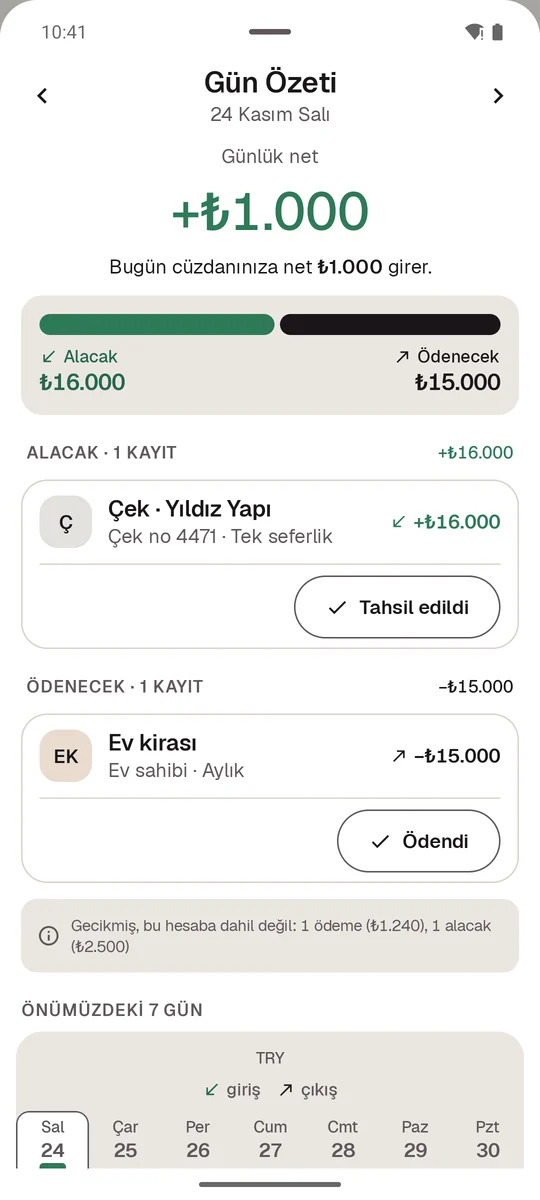
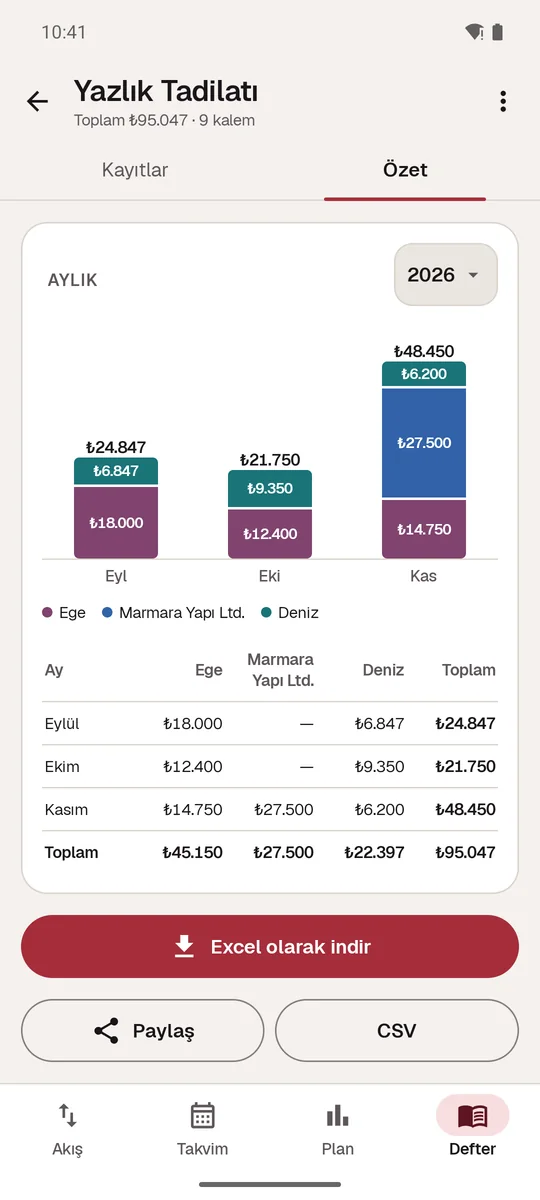
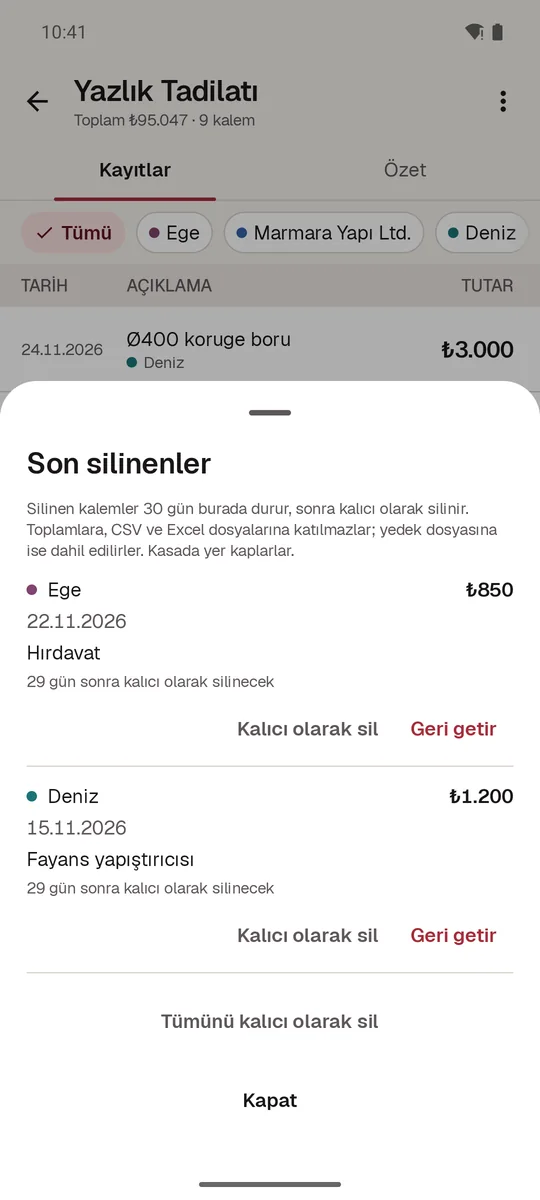
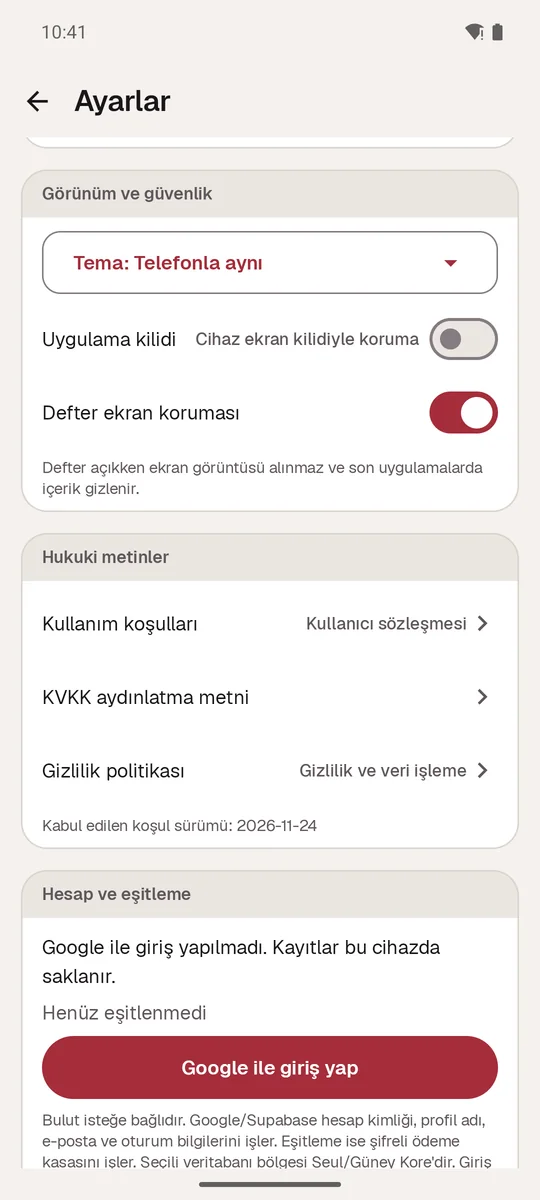
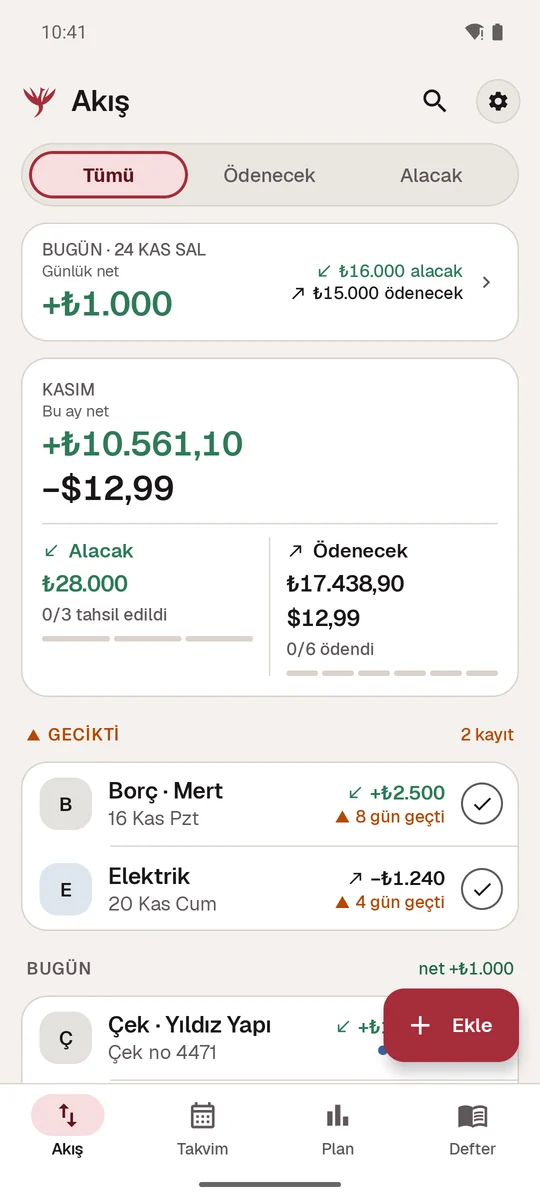
Real Android emulator screens of 2.4.1-phoenix (22), with sample records only. The app interface is in Turkish.
PayRadar 2.4.1 screen tour
A 60-second silent tour made from authentic Android emulator screens of version 2.4.1-phoenix (22). Sample records only. It is not a recording of live use or a physical-device test. The app interface shown is in Turkish.
Text summary of the video
- Flow: today’s net, the month at a glance, overdue items
- Day Summary: receivables, payables and the daily net
- New record: payable or receivable, with repeat options
- Calendar: month view and the selected day’s records
- Plan: what is left until payday, and the monthly view
- Ledger: shared costs recorded person by person
- Ledger summary: download as Excel, share or CSV
- Recently deleted: restore within 30 days
- Settings: Ledger screen protection
- Dark theme
Receivables and payments in one flow: Flow, Calendar, Plan and Shared Ledger
Alongside rent, bills, instalments and subscription renewals, keep your receivables in one place. The Flow (Akış) list works with the Tümü (All), Ödenecek (To pay) and Alacak (Receivable) views; Calendar (Takvim) orders due dates by day, and Plan by payday and the months ahead. Different currencies are never added together.
- Open a new record with “Ekle” (Add); choose whether it is payable or receivable, then enter the name, amount, currency, due date and how often it repeats. Pick a ready-made category or add your own.
- On the Flow tab, switch between the All, To pay and Receivable views; check today’s net, this month’s totals and overdue records.
- When you have paid something, mark it “Ödendi” (Paid); when you have collected a receivable, mark it “Tahsil edildi” (Collected).
- Tap the card for today on the Flow tab to open the Day Summary (Gün Özeti); it shows what comes in, what goes out and the net for the day you choose.
- On the Calendar tab, choose a day to see its records.
- On the Plan tab, set your income day; review what is due until payday and the monthly view.
- In the detail of a receivable, prepare a reminder message draft; you send the message yourself through the Android share sheet, and the app does not send it.
- For reminders, turn on payment reminders in Settings and allow Android notifications; check delivery on your own device.
Frequently asked questions
What changed in version 2.4.1?
The Shared Ledger can be downloaded or shared as an Excel file with working formulas. Deleted ledger entries can be restored from Son silinenler (Recently deleted) for 30 days. No screenshots can be taken while the ledger is open (this can be turned off in Settings). Paid and collected marks are kept in the encrypted vault and sync between devices. The ledger wording is calmer, and the terms and privacy notice were updated. Because of a new vault format, update all your devices to keep syncing.
What is a Radar card?
A short notice derived from your own records: a trial is about to end, a price has changed, instalments are about to end, a yearly payment is coming up or a receivable is overdue. The card names its source; “Neden görüyorum?” (Why am I seeing this?) opens the explanation, and you can hide the card. No bank data is used.
What is the Shared Ledger, and do I need to buy anything?
The Shared Ledger (Ortak Defter) records the expenses of a shared job by party and shows the totals and the difference between two parties; it can be exported as Excel or CSV. In this version it is open as a Premium preview; the app has no purchase, and this page gives no price.
Can I use it without an internet connection?
Yes. Records are encrypted on your device with Android Keystore. Without a connection you can add and edit records and receive local reminders. Cloud sync is optional.
Does PayRadar connect to my bank account?
No. PayRadar does not connect to a bank account, transfer money or make payments. You enter the records by hand; the app is a personal record and reminder tool. You also send a receivable’s reminder message yourself; the app does not send messages.
How do I get the Android version?
You need to join the Google Play closed testing track; the steps are on the Android access page. Version 2.4.1-phoenix (22) was sent to the Google Play closed testing (Alpha) track on 24 November 2026; testers receive this version. The release record is under “Current scope and limits” on this page.
Last updated: