
Mobile / Communication
LaserDeck PTT
Bluetooth communication between Android devices.
Product facts
- Stage
- Pre-release · source code public
- Technology
- Kotlin · Android · Bluetooth
- Information checked
- 19 November 2026
Pre-release · source code public
Bluetooth push-to-talk, calls, messages and photo transfer between two Android phones.
The need
Direct communication at close range, without an account or an internet connection.
Approach
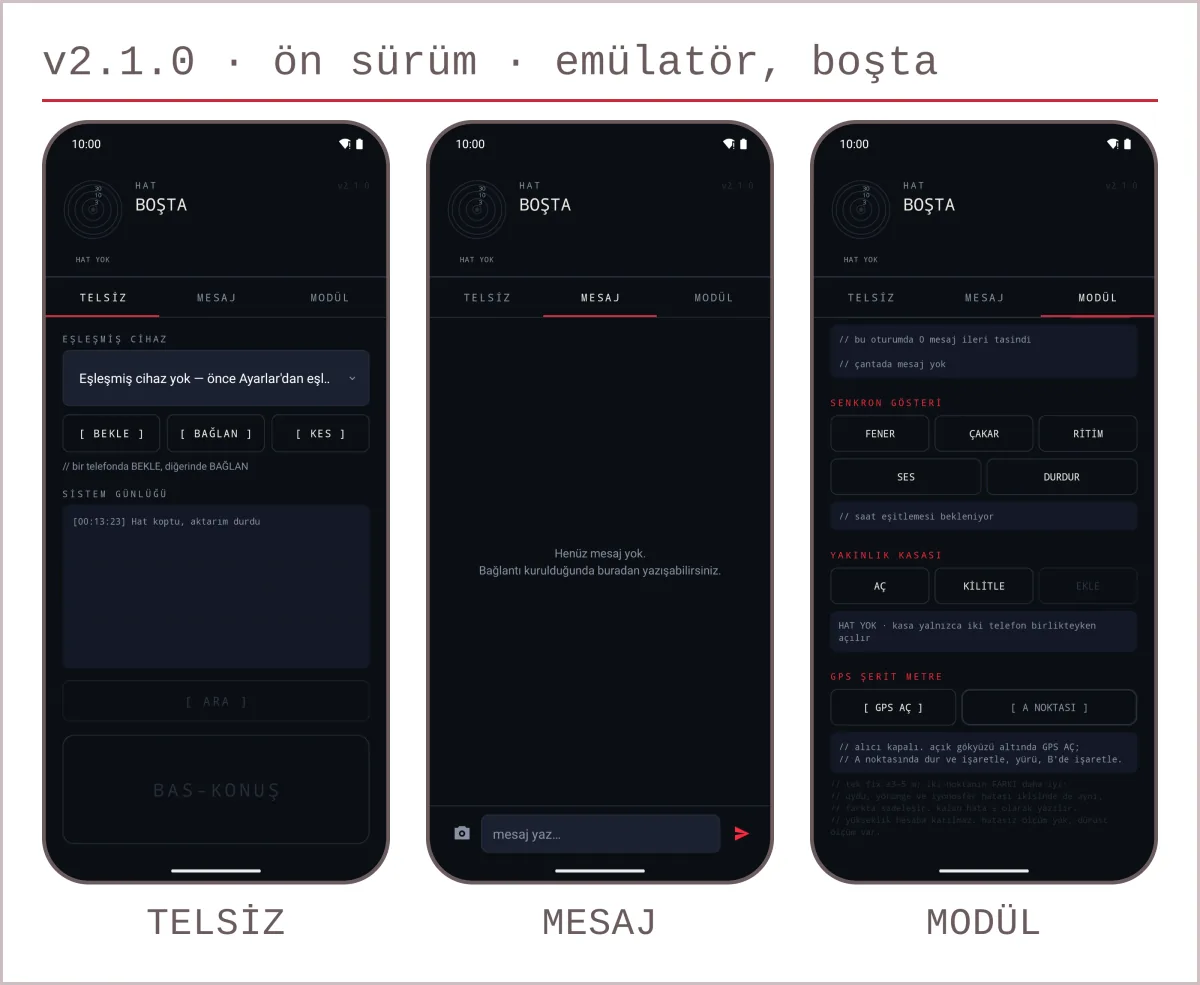
An Android app built on Bluetooth Classic RFCOMM, with push-to-talk, voice calls, messages, photo transfer, a proximity radar and a GPS tape measure.
Current scope and limits
v2.1.0 (version code 14) is a pre-release; its installation page is accessible and the source code is public. The app is not publicly available on Google Play; installation routes are described on the installation page. Check the Android access guide for the current access status or request test access. Photo transfer, the proximity radar and the GPS tape measure modules are part of this version. This is not optical laser hardware. It has not been re-tested on two physical devices.
Product information checked on 19 November 2026. Technical reviews of workflows carry their own dates. A reachable link does not mean every product workflow has been verified.
Push-to-talk over Bluetooth
It focuses on direct communication between two Android devices that are close together. The use case differs from a chat service tied to an internet account: the connection is made between the devices over Bluetooth.
- Check the supported version and the Android permissions it needs in the setup guide.
- Set up the Bluetooth connection on both devices and confirm the pairing.
- Try push-to-talk, calls and transfers with two devices in the place where you will use them.
Frequently asked questions
Is it LazerDeck or LaserDeck?
The official name of the product on this site is LaserDeck PTT. If you searched for the Bluetooth push-to-talk project as LazerDeck, this is the same product; its scope and access details are on this page.
Does communication need an internet connection?
Communication between the devices uses a Bluetooth Classic RFCOMM connection. You may need the internet to download the app or to open the guide.
What range does it work over?
No fixed range is promised. Phone hardware, obstacles and the surroundings affect the connection; measure it in the place where you will actually use it.
Does it use laser hardware?
No. Within this scope LaserDeck PTT is a software project based on Android and Bluetooth.
How do I get the test build?
Start from the Android access and test enrolment link. The test has to be published and your account has to be on the authorised list or in the group; you give the Google Play confirmation yourself.
Last updated: