
Everyday life / Finance
PayRadar
An Android app that follows receivables and payables in one flow, with a Day Summary, Calendar and Plan.
Product facts
- Stage
- Test build
- Technology
- Kotlin · Jetpack Compose · Material 3 · Room · Android Keystore
- In the closed test
- 2.4.0-phoenix (21), since 19 November 2026
- Information checked
- 19 November 2026
Test build
A Kotlin Android app that brings receivables and payables (rent, subscriptions, bills and instalments) into one flow, with a Day Summary, Calendar and Plan, offline records and local reminders. The former web app has been retired.
The need
Scattered recurring payments make renewals and total spending hard to see.
Approach
Version 2.4.0 adds receivables next to payables: the Flow list works with All, To pay and Receivable views, and records fall into ready-made categories or categories you add yourself. The Day Summary shows what comes in, what goes out and the net of the chosen day. Calendar shows due dates by day, and Plan shows what is due before payday and a monthly view. Radar cards flag an ending trial, a price change or an overdue receivable from your own records. For a receivable the app prepares a reminder message draft that you send yourself through the Android share sheet. The Shared Ledger is a Premium preview that records shared expenses by party; there is no purchase and no price. Amounts stay separate by currency. Terms, the KVKK (Turkish data-protection law) information notice and privacy information are separate sections in the app.
Current scope and limits
Android closed test. Access depends on joining the test on Google Play. The linked page is a download guide, not a browser payment app. Cloud sync is not server-blind end-to-end encryption. Local records are stored on the device; cloud sync is optional. This version uses a new vault format: update all your devices so that syncing can continue. Known limit: the paid and collected marks stay on this device and are not synced between devices. Version offered in the Google Play closed test: 2.4.0-phoenix (versionCode 21); checked in Play Console on 19 November 2026.
Product information checked on 19 November 2026. Technical reviews of workflows carry their own dates. A reachable link does not mean every product workflow has been verified.
19 November 2026 — version 2.4.0: receivables, the Day Summary and a Shared Ledger preview
- Receivables sit next to payables: you enter a record as payable (Ödenecek) or receivable (Alacak). Besides the ready-made categories you can add your own.
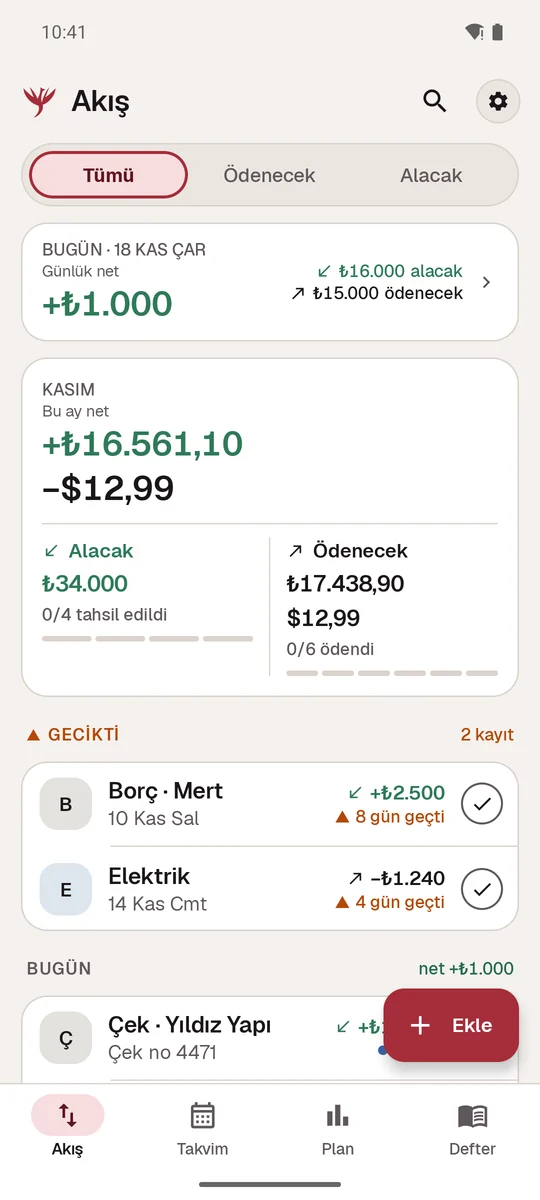
- The Flow (Akış) list: Tümü (All), Ödenecek (To pay) and Alacak (Receivable) views. You mark a payment “Ödendi” (Paid) and a receivable “Tahsil edildi” (Collected).
- The Day Summary (Gün Özeti) shows what comes in, what goes out and the net of the day you choose. Different currencies are never added together; overdue records are left out of the day’s figure and named separately.
- The Shared Ledger (Ortak Defter, a Premium preview) records the expenses of a shared job by party and shows who paid how much and the difference between two parties. In this version it is open as a preview only; there is no purchase and no price.
- A reminder message draft for a receivable is prepared in the record detail; you send it yourself through the Android share sheet. The app does not send messages.
- The earlier interface renewal (17 November 2026, version 2.3.0): the calmer “Kül” palette, the Geist typeface, Calendar (Takvim) and Plan tabs and Radar cards. The logo is unchanged.
Version 2.4.0-phoenix (21) has been in the closed test since 19 November 2026; testers receive this version. The release record is under “Current scope and limits” above. The app is not in production. Android notification permission and power management still apply to reminders.
Read the development notes for the earlier update ↗Four screens from the new interface
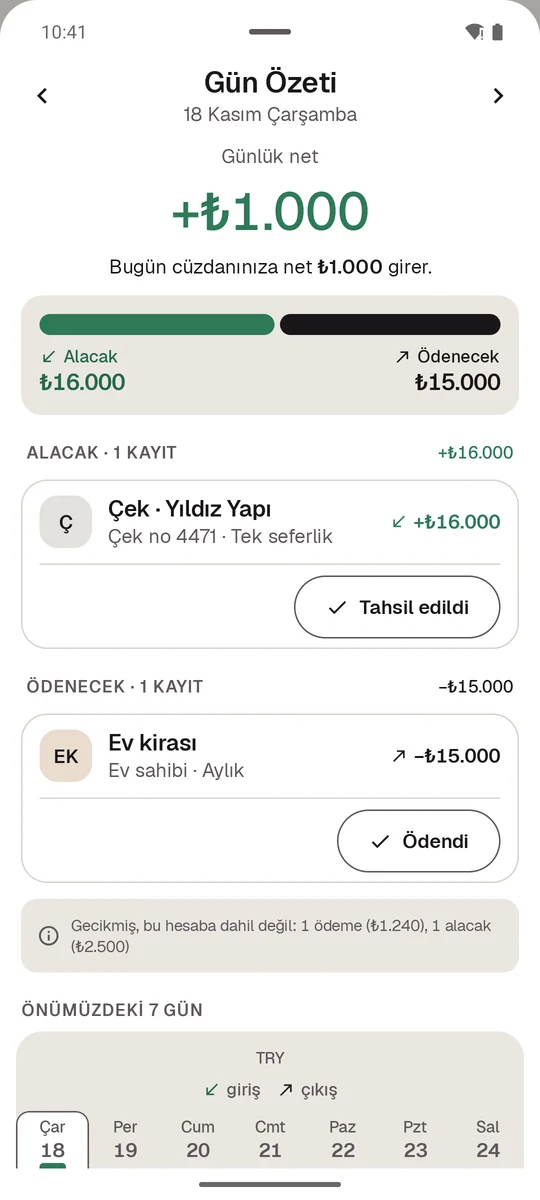
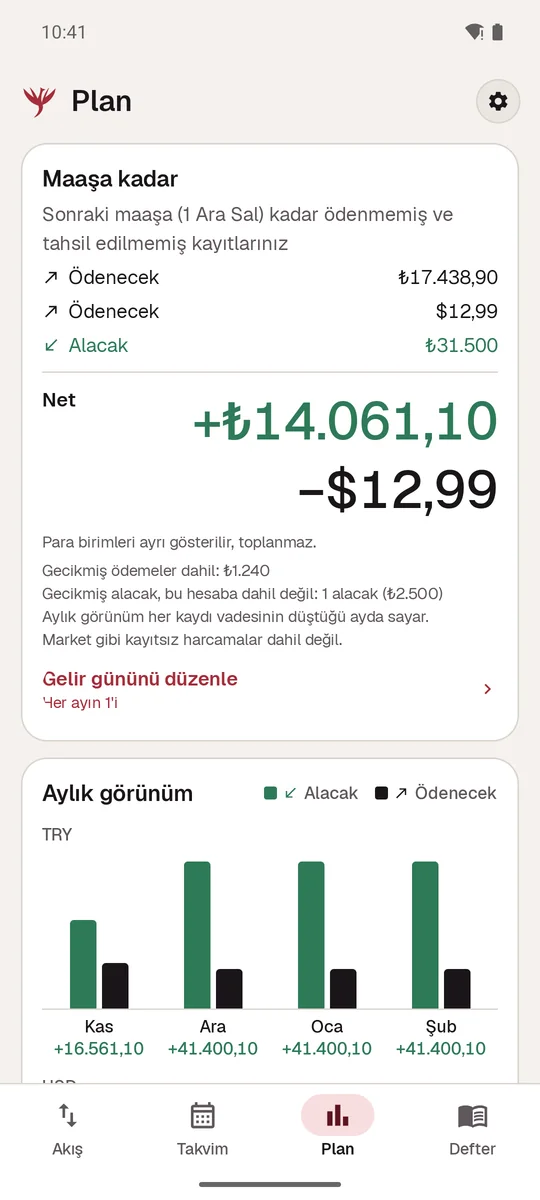
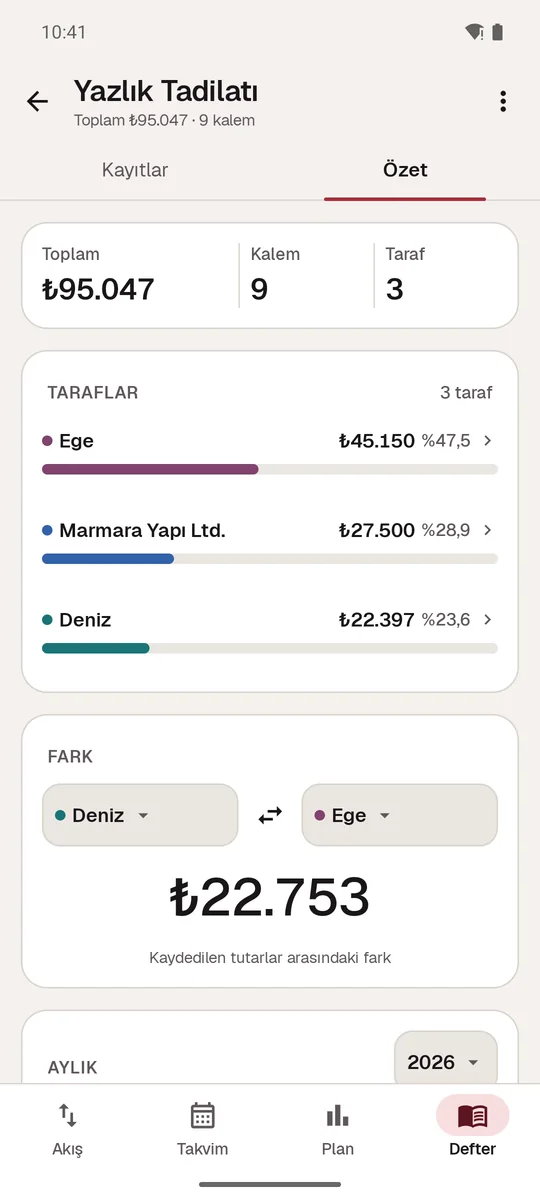
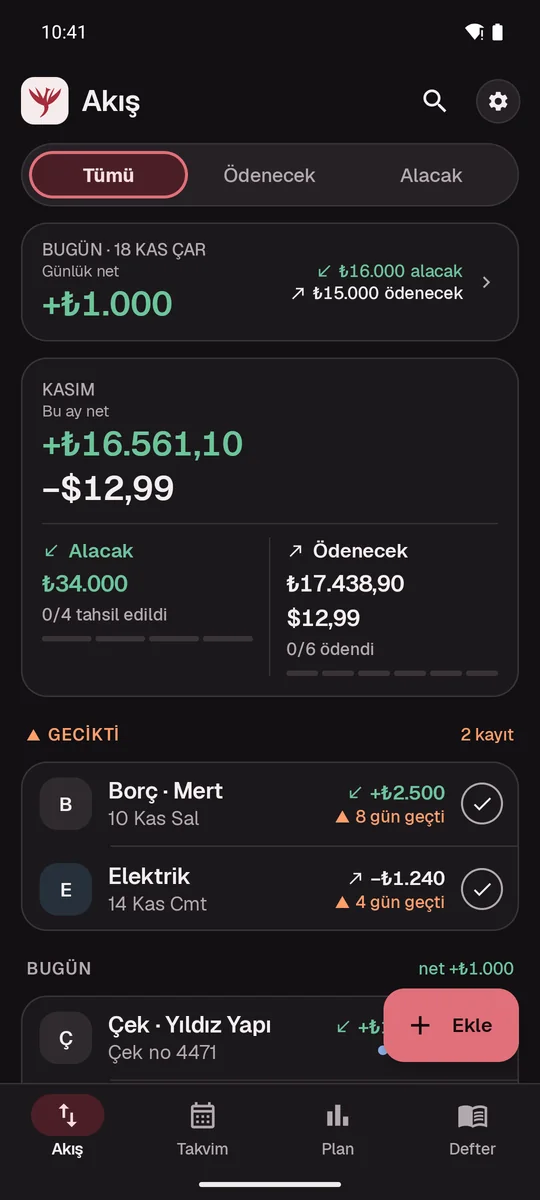
Real Android emulator screens of 2.4.0-phoenix (21), with sample records only. The app interface is in Turkish.
Receivables and payments in one flow: Flow, Calendar, Plan and Shared Ledger
Alongside rent, bills, instalments and subscription renewals, keep your receivables in one place. The Flow (Akış) list works with the Tümü (All), Ödenecek (To pay) and Alacak (Receivable) views; Calendar (Takvim) orders due dates by day, and Plan by payday and the months ahead. Different currencies are never added together.
- Open a new record with “Ekle” (Add); choose whether it is payable or receivable, then enter the name, amount, currency, due date and how often it repeats. Pick a ready-made category or add your own.
- On the Flow tab, switch between the All, To pay and Receivable views; check today’s net, this month’s totals and overdue records.
- When you have paid something, mark it “Ödendi” (Paid); when you have collected a receivable, mark it “Tahsil edildi” (Collected).
- Tap the card for today on the Flow tab to open the Day Summary (Gün Özeti); it shows what comes in, what goes out and the net for the day you choose.
- On the Calendar tab, choose a day to see its records.
- On the Plan tab, set your income day; review what is due until payday and the monthly view.
- In the detail of a receivable, prepare a reminder message draft; you send the message yourself through the Android share sheet, and the app does not send it.
- For reminders, turn on payment reminders in Settings and allow Android notifications; check delivery on your own device.
Frequently asked questions
What changed in version 2.4.0?
Receivables now sit next to payables: the Flow list works with the All, To pay and Receivable views, and records fall into ready-made categories or categories you add yourself. The Day Summary shows what comes in, what goes out and the net of the chosen day. The Shared Ledger is open as a Premium preview. For a receivable, a reminder message draft is prepared and sent through the Android share sheet. The logo is unchanged.
What is a Radar card?
A short notice derived from your own records: a trial is about to end, a price has changed, instalments are about to end, a yearly payment is coming up or a receivable is overdue. The card names its source; “Neden görüyorum?” (Why am I seeing this?) opens the explanation, and you can hide the card. No bank data is used.
What is the Shared Ledger, and do I need to buy anything?
The Shared Ledger (Ortak Defter) records the expenses of a shared job by party and shows the totals and the difference between two parties. In this version it is open as a Premium preview; the app has no purchase, and this page gives no price.
Can I use it without an internet connection?
Yes. Records are encrypted on your device with Android Keystore. Without a connection you can add and edit records and receive local reminders. Cloud sync is optional.
Does PayRadar connect to my bank account?
No. PayRadar does not connect to a bank account, transfer money or make payments. You enter the records by hand; the app is a personal record and reminder tool. You also send a receivable’s reminder message yourself; the app does not send messages.
How do I get the Android version?
You need to join the Android closed test; the steps are on the Android access page. Version 2.4.0-phoenix (21), with receivables and the Day Summary, has been in the closed test since 19 November 2026; testers receive this version. The release record is under “Current scope and limits” on this page.
Last updated: